
Poképark
The Poképark is a living park inside PKForge for up to 30 Pokemon, on one large map drawn by spritedmistery: the home park, volcano, snowy summit and coast. Animated sprites cover nearly every species, including supported shinies and forms. Day and night, rain and storms, and wild Pokemon wandering in change the scene. Inviting a Pokemon keeps its original in place; daycare write-back, Pokéwalker rewards, befriending visitors and releasing to the Wilds are separate actions described below.
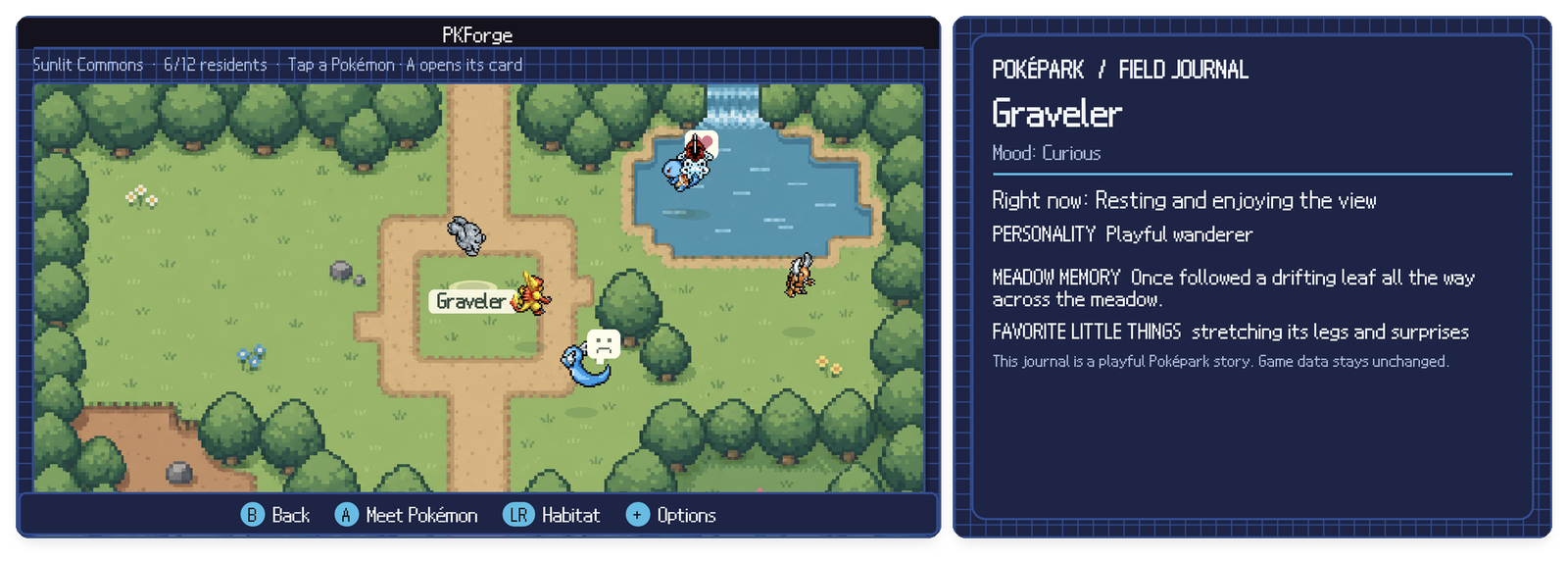
- Invite a Pokemon with + > Send to Poképark from a box or the Bank. The park keeps a snapshot; the Pokemon stays where it was.
- Open the park from the Poképark tile on Home.
- A meets a Pokemon and opens its card, L / R flies the camera between places on the same map, Up / Down zooms, and + opens options. Drag to move the camera and pinch to zoom on touchscreens. On AYN Thor, the left stick moves the camera and the right stick zooms. Left / Right follows another resident; − toggles spectator mode.
- Each resident has a mood, a personality and memories in the field journal (on the second screen on dual-screen devices). They have tempers, habits and favorite spots, make friends and rivals, form affectionate bonds, pick fights, play pranks and stand up for each other. Some species have their own moments and powers.
- Tap a Pokemon to open its card. Care, Bonds and About show its needs, relationships and temperament. Feed it berries, hold a finger on it to pat it, or choose Play for activities such as fetch, hide-and-seek and races. Short captions show what it is doing. Whether it plays depends on its temperament and your bond.
- Rare moments are announced at the top. Press X or tap an announcement to go and see; some events remain secret. The park journal records what happened. You can also help Pokemon during certain encounters.
- When no event invitation is showing, X takes a captioned photo. Open Options > Photo album to view and share it. Options > Today's goals gives three daily activities; Options > Time and weather lets you keep the real clock or choose the scene yourself.
- Options > Daycare opens Blissey's daycare for up to four residents. Growth and breeding depend on their own game's rules.
Warning
Daycare can change your real Pokemon. Write back to saves is On by default. On pick-up, permitted EXP growth can update the original save slot or Bank entry; a collected, supported egg goes to the Bank. Save writes get a restore point first, and EXP write-back is refused if the original Pokemon changed after check-in. Turn Write back to saves: Off to keep daycare results in the park. Unavailable source data or unsupported eggs can leave only park memories or keepsakes.
Release to the Wilds is different from Send to Poképark. It asks for confirmation and removes the Pokemon from its save or Bank; a save release has a restore point, while a Bank release has no undo. The Wilds remember it and it may return as a visitor, but this is not a way to keep the original in your collection.
Park sprites and portraits download on first use and are cached on the device. A bundled still sprite is used when the matching animation is unavailable. In Options > Music, choose music separately for Menus, Park by day and Park by night. Open Options > Credits or tap the PKForge statue for artist credits; see Credits.
Pokéwalker strolls
Open Options > Pokéwalker, choose one resident and an unlocked course. The original stays in its save or Bank. On a phone with an available step counter, allow physical-activity access if you want counted steps; Android 10 and later asks for permission. Without an available reading or permission, including sensorless handhelds, a time-based stroll earns 600 steps per hour, up to 3,000 per day.
Every 20 steps earns one watt. Poké Radar costs 10 watts and Dowsing costs 3 watts. A walk holds up to three catches and three items before returning home. Courses and encounters depend on progress; later ordinary courses also need National Dex information from an HGSS save.
On Come home, legal catches go to the Pokemon Bank and finds go to the Item Bank. The resident can gain one EXP per step, capped at its next level, plus friendship; eggs do not grow and level-100 Pokemon gain no EXP. The original must still be available and unchanged. Native save growth requires a supported PKHeX-backed save; custom hack engines are not automatically supported.
Important
The daycare Write back to saves setting also controls the walking resident's EXP and friendship. Turning it Off does not stop catches entering the Bank or found items entering the Item Bank.
Sync with HeartGold/SoulSilver updates the open HGSS save's unsynced steps, current watts and eligible course progress through the normal validated write path. It is save-data synchronization, not a connection to a physical Pokéwalker accessory. The separate HGSS editor is described in Save data editors.
Befriending wild visitors
Tap an eligible wild visitor and choose Try to befriend it. Follow its hint with a berry, waiting or play, with up to three tries before it may flee. Success can add a legally generated match to the Bank. Hardcore mode, cancellation or an unavailable legal result leaves a keepsake instead; not every visitor is eligible.
Weather, screensaver and widgets
Options > Time and weather also offers optional real weather for a city you type. It is Off by default. The app sends that city and its coordinates to Open-Meteo, without requesting device location, caches readings and falls back to the park sky if unavailable. Options > Screensaver can hide the interface after an idle interval; input wakes it.
Use Options > Home-screen widgets or Settings > Home-screen widgets for a living park, Pocket Pokéwalker, partner Pokemon or Day Care egg. See Settings for launcher and refresh limits.